


 Clarksville, TN – Stand in any line in town long enough — the doctor’s waiting room, the school pickup lane, the coffee counter downtown — and you’ll catch people doing something that would have looked strange two years ago.
They aren’t scrolling, and they aren’t texting. They’re talking to their phone, or typing it a question, and reading the answer it hands back like that’s the most ordinary thing in the world.
That’s the quiet story of 2026. The app people open first used to be a game or a social feed. Now it’s just as likely to be an assistant that talks back, sharing home-screen space with the TikTok and Facebook and WhatsApp that have held that ground for a decade.
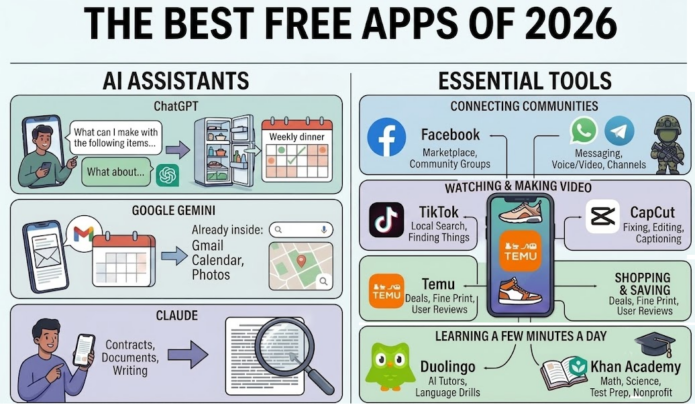
AI Assistants, people are learning to talk to
All three of the big three AI assistants do the same headline things. They answer questions, write and rewrite text, explain something complicated in plain words, and take a run at whatever problem you describe.
The differences show up once you use them for real work, and they’re sharp enough to matter. Each one is clearly better than the other two at something.

ChatGPT
 ChatGPT is the AI many people meet first and the one that takes a swing at anything. Its strength is range.
Turn a half-empty refrigerator into a week of dinners. Get a packing list for a trip you leave for Friday. Ask what the term your doctor used actually means. Have it walk a kid through a math problem a step at a time without once getting impatient. Most of what people ask it are one-off questions, answered and done.
It’s also the best of the three with pictures, in both directions — it can make an image, and it can look at one you send. Photograph a broken part, a plant in the yard, a form you can’t decipher, and ask what you’re looking at.
For anyone who wants one all-purpose assistant and no further decisions, this is the place to start.
Google Gemini
 Gemini‘s advantage is that it’s already inside the house. Google built its assistant into most Android phones and into Gmail, Maps, Photos, and Search, so for millions of people it’s been sitting there unopened for months.
That position is the whole pitch. Give it permission and it can work from your own material — the confirmation number buried in an email from March, what’s on the calendar Thursday, the receipt you photographed in June. It also carries the freshest information of the three, since it draws on Google’s live search results.
It is worth understanding what Google is asking for, though. Letting Gemini into your mail and your photos is a bigger grant than simply asking a chatbot a question, and it lands with a company whose money comes almost entirely from advertising.
Google’s platform is built to know you well enough to sell that attention, and an assistant reading your inbox and your calendar isn’t a side feature of that arrangement — it’s more of your life inside it. While this may be reasonable if your day already runs through Google’s apps, but worth a hard think if it doesn’t.
Claude
 Where the others answer a question and move on, Anthropic’s Claude is built for the thing you keep coming back to.
Hand it the document nobody wants to read — a thirty-page insurance policy, a lease, the school handbook, a contract before you sign it — and ask what it actually says, which parts deserve attention, what changed since the last version, and what you should be asking before you agree to it.
It’s also the strongest writer of the three, without the stiff press-release cadence that gives these tools away, so a letter it helps you rework still sounds like you. And it’s the most willing to stay in an argument: push back on it, correct it, make it defend a position, and it will hold a long conversation rather than restating the same answer in new words.
People who live in paperwork and people who write for a living tend to end up here.
Before you take any of them at their word
All three earn their place, and plenty of people keep more than one. A quick-answer app and a serious-writing app aren’t the same tool. None of them has become indispensable, so there’s no wrong pick, only a wrong fit.
There’s a practical reason to keep all three, too. The free versions each cap how much you can use them in a stretch, and the cap arrives fastest when you’re deep in something — a long document, a project you’re several hours into. When one stops you, another picks up the work.
They also share a failure mode. All three will sometimes be wrong with total confidence. The industry calls a made-up answer a “hallucination,” a soft word for a machine inventing a citation, a date, or a dollar figure and delivering it in the same steady voice it uses for the truth. The AI isn’t trying to deceive you. These systems are built to produce a plausible answer, and plausible isn’t always correct.
For a recipe or a rough draft, a mistake costs nothing. For your health, your money, or the law, it can cost you plenty.
The rule worth keeping: use them to understand something, not to decide something. Ask what a term means, what a document says, what questions to bring to your doctor or your accountant. Then check anything you intend to act on. If it cites a statute, a study, or a deadline, look it up yourself, and ask where a number came from.
They’re at their best explaining what’s in front of you, and at their worst when you let them have the last word.
A plain search still beats an assistant when you want the source itself: a phone number, a store’s hours, a link you can see and judge for yourself. The assistant wins when you’d rather have something explained or drafted than a page of results to sort through. Most people end up using both — the search to find it, the assistant to make sense of it.
Keeping up with people and places
 Everybody loves to call Facebook the app your parents use, and everybody keeps it installed anyway. In a town this size it quietly turned into three things at once: the classifieds, the community bulletin board, and the lost-and-found. Marketplace is where a used couch or a beat-up truck actually finds a buyer. The groups are where a church spins up a meal train overnight, a neighborhood hunts for a missing dog, a school warns you the schedule changed. That machinery — not the feed full of arguments — is why it holds its spot on the home screen.
Instagram and Threads
 Instagram is the photo album that turned into a messaging app; plenty of people now trade DMs there more than they post. Threads, its text-only sibling, is the place for the quick thought and the running conversation. For a small shop, an artist, or a nonprofit, the two together are the shortest path to the people already paying attention — and, more and more, to selling them something.
WhatsApp and Telegram
 WhatsApp does one thing and refuses to charge for it: messages, voice notes, and video calls to anywhere with a signal, locked down with encryption.
In a town built around Fort Campbell, that isn’t convenience, it’s a lifeline — a spouse and a deployed soldier can talk every night without the international bill that used to make long-distance expensive.
Telegram is the one most people meet through its channels, the broadcast feeds that clubs and communities use to reach everyone at once.
Watching and making video
TikTok
 TikTok‘s reputation for swallowing an evening is well earned. What gets less attention is what it’s quietly useful for: finding things. The fix for your exact dishwasher. A dinner built from what’s already in the pantry. An honest, unsponsored take on a mattress. A downtown restaurant’s Tuesday special. Linger on something and it hands you ten more like it, which makes it a shockingly good search engine for the practical and the local. Plenty of Clarksville shops and kitchens use it to reach neighbors who’d never have found them otherwise.
The catch is that the scrolling is engineered not to stop. The one setting worth changing is the daily time limit — both iPhone and Android will enforce one for any app. Two minutes of setup buys back a lot of lost evenings.
CapCut
 CapCut is a free video editor, and never mind the influencer stuff — its real use is fixing the videos you already shoot. Trimming the dead thirty seconds off a clip of your kid. Captioning a message for a relative who can’t hear it well.
Turning a year of scattered phone footage into something worth mailing the grandparents. Work that used to demand a computer and pricey software now happens on the phone, for nothing.
Shopping on your Phone
Temu
 Temu runs on one hook: prices so low they feel like a glitch. Gadgets, kitchen junk, clothes, tools — cheap and bottomless. The prices are real, and so is the fine print. Shipping crawls, quality is a coin flip, and the app rewards anyone who reads the reviews, studies the photos real buyers post, and finds the return policy before the cart fills up.
Like any store that lives in your pocket, it’s worth remembering how much of your spending and browsing you’re trading for the bargain.
Learning a few minutes at a time
Duolingo
 Duolingo turned language drills into a game and somehow got millions of people to keep showing up a few minutes a day — the nagging streak, the tiny lessons, the green owl that’s become a meme in its own right.
This year it added AI tutors you can actually hold a practice conversation with, which takes some of the fear out of saying the first sentence out loud. It’s the app for the trip you booked, the class you’re propping up, or the language you’ve meant to learn since college.
Khan Academy
 Khan Academy is the one nobody goes looking for and everybody should. It’s a nonprofit that gives away thousands of lessons and practice sets — math, science, history, economics, test prep — the kind of material that costs real money almost everywhere else.
For a town with a university, an Army post, and a few thousand school kids, the fit writes itself: the Austin Peay student patching a shaky prerequisite, the parent stuck on homework a grade past their own, the teenager grinding through SAT prep, the adult finishing what got interrupted years ago. And because it lives on donations instead of subscriptions, it’s simply free. No trial to cancel, no upsell, no charge waiting at the end of the month.
What “Free” is actually costing you
Here’s the part the download page leaves out: none of these apps are actually free. They earn their keep on advertising, on the upgrade they keep nudging you toward, on the data they quietly collect, or on the plain fact that your attention is the product. Khan Academy, funded by donations, is the lone exception. For everything else it’s a fair enough trade — but a trade, and one worth making on purpose instead of by accident.
Protecting yourself costs about five minutes. The Federal Trade Commission warns that an app hoarding more data than it needs is just more data to leak the day it gets breached, and federal cybersecurity officials at CISA say to check app permissions regularly.
Almost nobody does: Pew Research found that 59 percent of American adults are uneasy about apps grabbing data that has nothing to do with the app’s job, and most never look at the setting again after installing.
You don’t have to be technical. On an iPhone, Settings, then Privacy & Security, shows which apps can reach your location, microphone, camera, contacts, and photos. On Android, it’s Settings, then Security & privacy, then Permission manager. A flashlight has no business with your contacts, and few apps need your location “always” when “only while using” does the job. Look once or twice a year, especially after a big update — that’s when new permission requests like to slip in.
Which Ones are worth it
The apps on this list aren’t all competing for the same reason. Most are refinements of something phones have done for a decade — messaging, classifieds, video, a storefront. The AI assistants are the exception, and they’re the reason this year looks different from last year.
Consider what came before. Messaging replaced phone calls. Streaming replaced a good share of television. Social networks changed how we share our lives. Each one improved a thing people already did. An assistant introduces a different kind of interaction altogether: instead of opening a tool and working out how to use it, you describe what you need and let the tool work out the next step. That’s new, and it’s why an assistant is the one app on this list worth installing even if you’re not sure yet what you’d do with it.
Which one matters less than picking any of the three and using it on real work for a couple of weeks. The people who get the most out of these tools aren’t the ones inventing clever test questions. They’re the ones handing over the ordinary stuff: the document nobody wants to read, the meal plan, the letter that needs to sound right, the thing a kid is stuck on.
The same rule covers everything else here. The best app isn’t the one with the most downloads, it’s the one that solves a problem you already have. WhatsApp matters because someone you love lives far away. Facebook matters because your community is already there. Khan Academy matters because somebody in the house is trying to learn something. Duolingo matters because you finally want to start the language you’ve put off for years.
The download button makes every app look equally valuable. They are not.
Storage stopped being the scarce resource years ago — modern phones have room for everything. The real question is which apps have earned your time, your attention, and considering the information you’re handing them, because every app here was built by people who understand the value of all three better than you do.
The ones worth keeping give something back: an hour saved on paperwork, a call with someone far away, a language you actually learn, a kid who finally gets it. The rest are just very good at seeming worth it.