

 Clarksville, TN – Most people hear the word “cybersecurity” and picture a room full of specialists watching code scroll down a screen. That world exists, but it is not the one most of us live in.
The things that actually keep an ordinary person safe online are not technical. They are habits, and you can pick them up in an afternoon without understanding a single line of how any of it works underneath.
What follows is three of those habits, in plain language. You do not have to do all of them today — if you only manage the first one this week, you are already ahead of most people.
Find Out If Your Information Is Already Out There
When a company you do business with gets hacked, the email addresses, passwords, and other details they were holding can end up dumped onto the internet for anyone to grab. This is called a data breach, and it happens constantly.
The uncomfortable truth is that if you have used the internet for more than a few years, some of your information has almost certainly been exposed already — often by a company you forgot you ever signed up with.
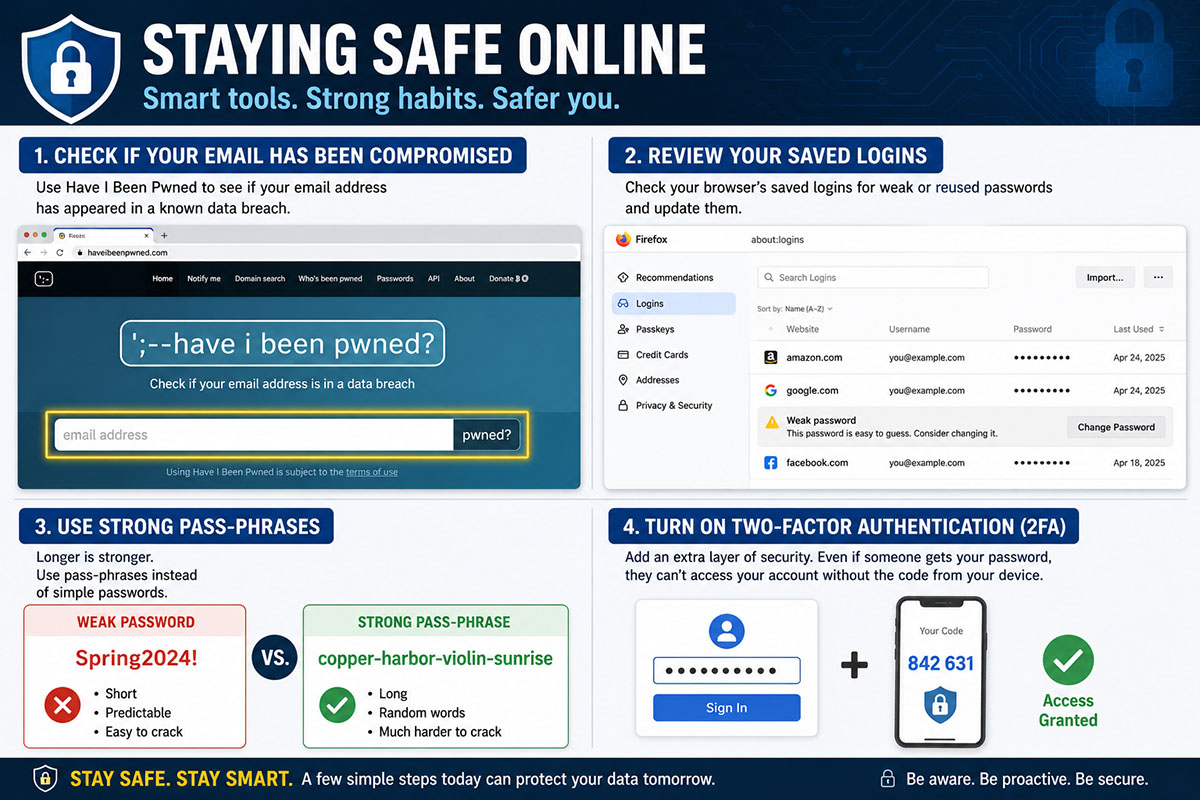
The good news is that you can check for free, in about thirty seconds. Go to www.haveibeenpwned.com (the odd spelling is intentional), type in your email address, and press the button. The site will tell you exactly which breaches your address has turned up in and what kind of information was exposed each time. It is run by a well-known and respected security researcher, it does not charge you anything, and it does not store the address you type in.
While you are there, you can sign up to be notified automatically the next time your address appears in a breach. That way you learn about it the moment it happens instead of months later. It takes two minutes and then it quietly watches your back.
If you use the Firefox browser, Mozilla Monitor does the same checking against the same database, just wrapped in a friendlier screen. And for anyone who used to rely on Google’s dark web alerts: Google shut that feature down in early 2026, so the tools above are now the ones to use.
If your check comes back clean, wonderful. If it does not, do not panic. It simply means it is time to change the password on the account that was exposed, and on any other account where you used that same password. That second part matters more than people expect, and it leads straight into the next habit.
Build Passwords the New Way, Not the Old Way
For twenty years we were told a good password needed a capital letter, a number, a symbol, and a fresh change every few months. It turns out that advice was wrong. The man who wrote those original rules has since publicly apologized for them, because they pushed people toward passwords that were hard for a human to remember but easy for a computer to guess, like “Spring2024!”
The current thinking, updated by the federal government’s own standards body in 2025, is much simpler: length beats complexity. A password made of several ordinary words strung together is both easier for you to remember and far harder for a criminal to crack than a short tangle of symbols. Something like “copper-harbor-violin-sunrise” is a genuinely strong password, and you can actually keep it in your head. The longer it is, the better, and you no longer need to sprinkle in symbols to make it count.
But the single most important rule about passwords is not about how you build them. It is this: never use the same password on more than one account. The reason ties back to breaches. When criminals get a password from one hacked company, the very first thing they do is try that same email and password on banks, email providers, and shopping sites, betting that you reused it. If you did, one company’s mistake becomes a break-in across your whole life. A different password on every account stops that cold.
Two smaller points while we are here. You no longer need to change a strong password on a schedule; only change it if you have a real reason, such as learning it was exposed. And when a website makes you answer a security question like your first pet’s name, you do not have to answer honestly — treat the answer like another password, because anyone who reads your social media might already know the real one.
Stop Trying to Remember Them All
 Reading the advice above, you may have spotted the problem. A different long passphrase for every single account is more than any human can carry in their head. You are not supposed to. That is a job for a tool called a password manager.
A password manager is a secure vault that remembers all your passwords for you, fills them in automatically when you log in, and can invent strong, unique ones whenever you open a new account. You only have to remember one strong master password to get into the vault. Everything else, it handles.
You may not need to buy anything for this, because the browser you already use very likely has a password manager built in and waiting. Personally, I rely on the one inside Firefox for most of my logins. It is free, it is already there, it syncs your passwords across your computer and your phone, and it will even warn you when one of your saved passwords is weak or has shown up in a breach.
For the great majority of people, a browser’s built-in manager is perfectly good — and an enormous step up from reusing the same password everywhere or keeping them on a sticky note. If you go this route, protect the account that holds the vault itself with a strong master password and the second layer of security described next.
That second layer is worth turning on for your most important accounts — anything tied to your money or your email. It is called two-factor authentication, and it asks for one extra confirmation when you log in, usually a short code, so that your password alone is not enough for a stranger to get in.
Where you are given the choice, a code from an authenticator app is safer than one sent by text message. And if a website ever offers you something called a passkey, take it: a passkey lets you sign in with your fingerprint, your face, or a PIN, and there is simply no password left for anyone to steal.
None of This Has to Happen at Once
If the whole list feels like a lot, ignore the list and do one thing. Go to www.haveibeenpwned.com this week and check your email address. Whatever it tells you will point you naturally to the next step. These habits build on each other, and every one of them puts a little more distance between you and the people who would rather you stayed an easy target. You do not have to become an expert. You just have to start.
Staying Safe Online Series
- Why Would Anyone Want to Hack Me?
- You Don’t Have to be a Tech Expert to Protect your Accounts
- If They Contact You First, Be Suspicious
About This Series
The “Staying Safe Online” series on Clarksville Online is written to help local readers recognize and respond to common online safety and computer issues, drawing on the author’s professional background in computer repair, networking, and malware removal. It is intended as general education, not as personalized technical, legal, or security advice for any individual’s specific device, account, or situation.
Computer systems, software, and online accounts vary widely, and a step that resolves one person’s issue may not apply — or may not be appropriate — for someone else’s setup. Before making changes to your computer, accounts, network settings, or security software based on anything in this series, you should use your own judgment about whether it fits your situation, and consult a qualified professional if you’re uncertain.
Clarksville Online and the article’s author make reasonable efforts to provide accurate and helpful information at the time of publication, but technology changes quickly, and we cannot guarantee that every recommendation remains current or applicable to every device or system. Neither Clarksville Online nor the author can be held responsible for any loss, damage, data loss, account issues, or other consequences that may result from actions taken based on this content.
If you believe your device or accounts may already be compromised, or if a problem is urgent, we recommend contacting a professional computer repair service or your account provider’s official support channels directly, rather than relying solely on general articles like these.