


 Clarksville, TN – Almost everything in the previous article — the strong passwords, the second layer of login security, all of it — can be undone in a single moment if someone simply talks you into handing over the keys. This is the uncomfortable heart of online safety: the most effective attacks are not technical at all.
They do not break your password; they convince you to type it in for them, or to read it out over the phone. The con even has a name, social engineering, though you do not need the term. You only need to recognize its shape, because it nearly always shares one feature — someone you did not expect reaches out to you, and gives you a reason to act in a hurry.
The Trick Behind Most Hacks Isn’t Technical — It’s You
A criminal who wants into your accounts has two options. He can try to defeat your password and your security, which is slow and often fails, or he can persuade you to let him in, which is fast and works far too often. Given the choice, he picks persuasion almost every time.
The persuasion runs on two emotions: trust and urgency. First the message or caller pretends to be someone you would naturally believe — your bank, a familiar company, a government office, even a relative. Then it manufactures a reason you must respond right now, before you have time to think it through. A frozen account, a suspicious charge, a package that cannot be delivered, a fine you must pay today.
The pressure to hurry is not a side effect of the scam. It is the engine of it, because a person who slows down is a person who notices the cracks.
Links in Email and Social Media: Stop Before You Click
The most common version arrives as a link — in an email, a text message, or a direct message on social media — that wants you to click and then sign in or enter information. The trap is that you cannot trust a link simply because of who it appears to come from. Email senders are easy to fake, and real social media accounts get hacked and used to message everyone in the owner’s friends list. A message that looks like it came from someone you know may not have.
Two things should put you on guard immediately. One is urgency — any message insisting you act now or lose something. The other is a link itself, especially one asking you to log in or confirm details. The safest assumption is that an unexpected link is guilty until proven innocent.
How to Check Where a Link Really Goes
A link can say one thing on the surface and send you somewhere else entirely, and there is a simple way to see its true destination before you commit. On a computer, rest your mouse pointer on the link without clicking, and the real web address will appear, usually in a corner of the screen. On a phone, press and hold the link instead of tapping it, and a preview of the real address will pop up.
Look at that real address carefully. If a message claims to be from your bank but the link points somewhere that is not plainly your bank’s website, do not click it. And here is the habit that makes all of this easy: when you are not certain, do not use the link at all. Open your browser and go to the company’s website yourself, by typing the address you already know or using a bookmark. You end up in the same place you needed to be, with none of the risk.
The Phone Call That Wants Your Information
The same con works just as well over the phone, and for many people it is even more convincing because there is a live voice on the line. The caller claims to be from your bank, a tech company warning you about a virus, the tax office, or another authority. The script is built to frighten: your account has been compromised, your computer is infected, you owe money, and you could be arrested. And it always, always pushes you to act immediately.
The rule here is short, and it does not have exceptions worth worrying about: never give personal or financial information to someone who called you. Not your passwords, not your card numbers, not the codes that get texted to you, not remote access to your computer. You did not place the call, so you have no way to know who is really on the other end.
Real Companies Don’t Work This Way
It helps to know what legitimate institutions actually do, because the gap between that and the scam is wide. Your bank will never call and ask you to read back your password or your full card number, and it will never ask you to move your money to keep it “safe” or to pay in gift cards.
Government agencies do not call to demand instant payment under threat of arrest. And no real company will object if you say you would like to hang up and call them back. A scammer, by contrast, will fight hard to keep you on the line, because the moment you hang up, the spell breaks.
When in Doubt, Hang Up and Call Back on a Number You Looked Up Yourself
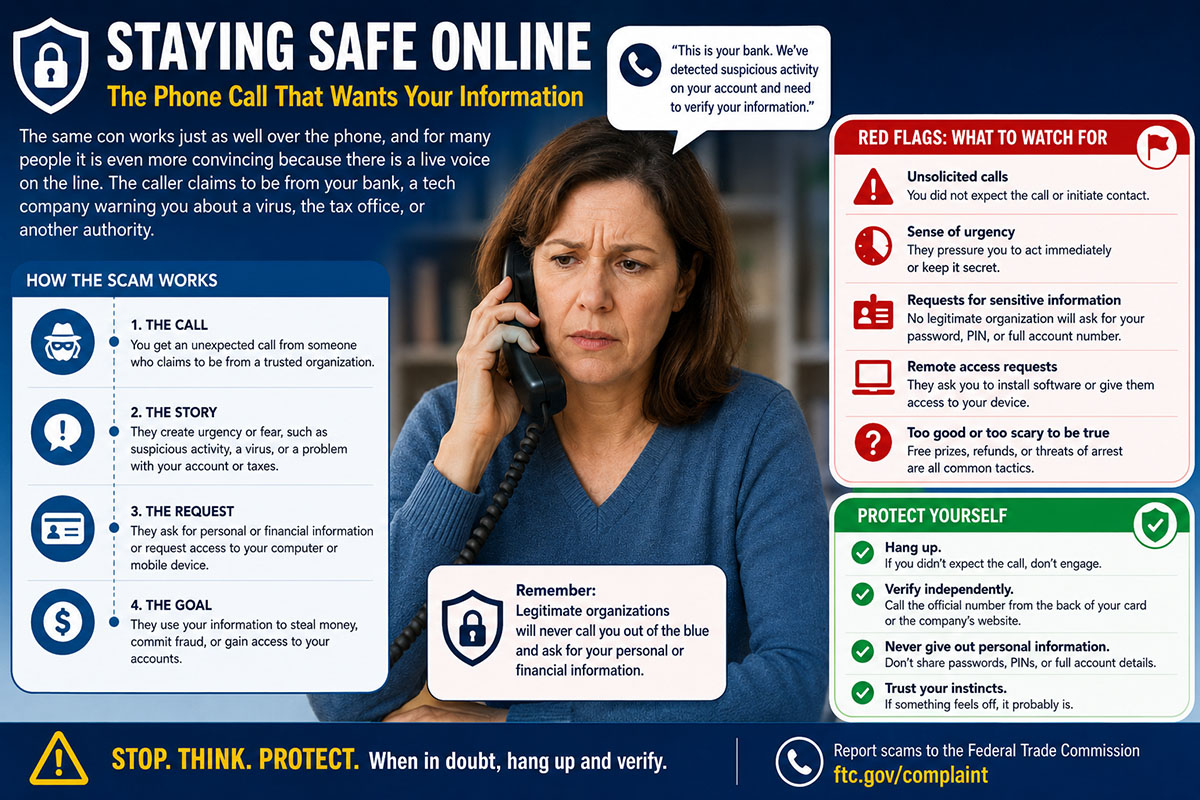 If you remember nothing else from this article, remember this one move, because it defeats nearly every phone scam on its own. When a call makes you uneasy, end it. Then find the organization’s real number yourself — on the back of your bank card, on a statement, or on their official website — and call that number to ask whether anything is actually wrong.
Do not call back any number the suspicious caller gave you, and do not trust the number that showed up on your screen, because those can be faked too. Looking up the number yourself and starting the call yourself puts you back in control of who you are really talking to. The con depends on speed and surprise. Slowing down and calling back on your own terms takes both of those away.
Staying Safe Online Series
- Why Would Anyone Want to Hack Me?
- You Don’t Have to be a Tech Expert to Protect your Accounts
- If They Contact You First, Be Suspicious
- Staying Safe Online: Is My Computer Hacked? How to Tell, and What to Do
About This Series
The “Staying Safe Online” series on Clarksville Online is written to help local readers recognize and respond to common online safety and computer issues, drawing on the author’s professional background in computer repair, networking, and malware removal. It is intended as general education, not as personalized technical, legal, or security advice for any individual’s specific device, account, or situation.
Computer systems, software, and online accounts vary widely, and a step that resolves one person’s issue may not apply — or may not be appropriate — for someone else’s setup. Before making changes to your computer, accounts, network settings, or security software based on anything in this series, you should use your own judgment about whether it fits your situation, and consult a qualified professional if you’re uncertain.
Clarksville Online and the article’s author make reasonable efforts to provide accurate and helpful information at the time of publication, but technology changes quickly, and we cannot guarantee that every recommendation remains current or applicable to every device or system. Neither Clarksville Online nor the author can be held responsible for any loss, damage, data loss, account issues, or other consequences that may result from actions taken based on this content.
If you believe your device or accounts may already be compromised, or if a problem is urgent, we recommend contacting a professional computer repair service or your account provider’s official support channels directly, rather than relying solely on general articles like these.